

A quick post about something I was looking for some time, a way to share links to Google+ from outside their service. There are two interesting options available now.
Since I did a complete remake of my site, I like all components to fit in as I want. I went with different share buttons solutions in the past but I found them too cluttered. Hence the small black buttons for Twitter and Facebook at the top and bottom. I also wanted Google+ to join the game, but the +1 button did not present you with options for sharing (message box, your circles). Most important was that the +1 button did not fit my web design. It seemed that there was not an easy way to share URLs from outside Google+.
I did a new search today and I was pleasantly surprised that solutions are available now:
- This first solution from Alex Moss uses the URL from the Google+ mobile site to present a popup with the current URLs content. It is pretty neat stuff.
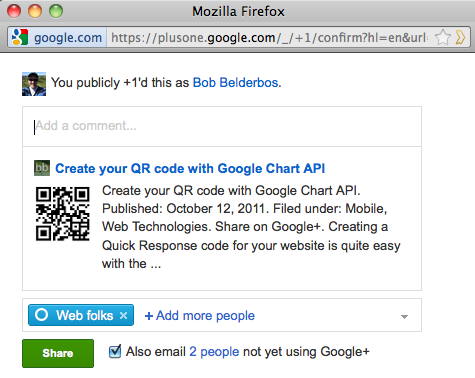
- I went on reading some of the comments of that solution and I found a Simple Google+ Bookmarklet by AJ Batac. Clicking the first link I was surprised to see a popup with the same look and feel as Google+. I was slightly confused with the "..You publicly +1..as .." message (which does not mean you +1-ed or posted anything yet). However, when I clicked in the textfield below this message, I saw the rich URL info with the circles to share with, just as if I was inside Google+ :
So big thanks to Alex Moss and AJ Batac for developing this!
Implementation
I choose the 2nd solution for now and as you see I have my own small Plus button above and below this article :)
JS will dynamically grab the active URL and title, and Google+ finds the metainfo (similar to Facebook Like which does this somewhat better to my taste)
I added spaces for clarity :
<div class="bookmarklet">
<a href="
	javascript:(
	  function(){
		var w=480;var h=380;
		var x=Number((window.screen.width-w)/2);
		var y=Number((window.screen.height-h)/2);
		window.open('https://plusone.google.com/_/+1/confirm?hl=en&url='+encodeURIComponent(location.href)+'
			&title='+encodeURIComponent(document.title),'','width='+w+',height='+h+',left='+x+',top='+y+',
			scrollbars=no');
  	  })();">
	Share to Google+</a>
</div>
By the way, this is an interesting article about bookmarklets
Update 28.09.2012
The above code doesn't seem to work anymore so I tweaked it based on this entry on Stackoverflow, see code below. There is a share link now that works well, plus a bit of JS to have it in a popup. If you want to test it, you can click the black plus button (after the Facebook one) at the top and bottom of this article.
# HTML

<!-- on homepage -->
<a title="share on google+" href="#" onclick="return googleplusbtn('http://bobbelderbos.com')"><img src="http://bobbelderbos.com/wp-content/themes/bamboo/i/plus-icon.png" alt="Share on Google+" /></a>

<!-- per article -->
..
$postmeta .= '<a title="share on google+" href="#" onclick="return googleplusbtn(''.$permalink.'')"><img src="http://bobbelderbos.com/wp-content/themes/bamboo/i/plus-icon.png" alt="Share on Google+" /></a>';
..

# JS
<script>
function googleplusbtn(url) {
  sharelink = "https://plus.google.com/share?url="+url;
  newwindow=window.open(sharelink,'name','height=400,width=600');
  if (window.focus) {newwindow.focus()}
  return false;
}
</script>
